HiSoft
BASIC
For
ZX Spectrum, ZX Spectrum +, ZX Spectrum 128 & ZX Spectrum Plus 2
A
Fast Floating-Point ZX BASIC Compiler
First
Edition October 1986 ©
Copyright HiSoft 1986
Please
buy, don’t steal
HiSoft The
Old School Greenfield Bedford MK45 5DE Tel (0525) 718181
HiSoft
BASIC was written by Cameron Hayne
All
Rights Reserved Worldwide. No part of this publication may be reproduced or
transmitted in any form or by any means, including photocopying and recording,
without the written permission of the copyright holder. Such written permission
must also be obtained before any part of this publication is stored in a
retrieval system of any nature.
It
is an infringement of the copyright pertaining to HiSoft BASIC
and its associated documentation to copy, by any means whatsoever, any part of HiSoft
BASIC for any reason other than for the purpose of making
one security back-up copy of the object code.
Contents
Introduction
How
to Use HiSoft BASIC
HiSoft
BASIC Commands
Summary
of differences from Spectrum Basic
Variables
Numerical
Constants
Conversion
between Types
Compiler
Directives
Notes
on compiled BASIC
Including
other machine code
Compiling
large programs
Tips
on Efficiency
What
if it doesn't work?
Error
Messages
The
meaning of the dots and colours
Making
a back-up copy
Memory
Maps
Runtimes
Appendix
1 - Spectrum 128 version
Introduction
HiSoft
BASIC is a BASIC compiler that surpasses all others for the
Spectrum. There are integer compilers that can make Basic programs run more
than 100 times faster but they only handle integers (no decimals, only whole
numbers from - 32768 to 32767 or from 0 to 65535) and often have other
restrictions. There are floating-point compilers that handle the full range of
decimal numbers and all of the Spectrum's functions but (in spite of advertised
claims) they speed up programs by only a factor of 3 to 5.
HiSoft
BASIC combines the advantages of these two types of
compilers without any of the disadvantages. It is a floating-point compiler
that can obtain the speed of an integer compiler when doing operations that
don't require the complexities of floating-point arithmetic. In fact, HiSoft
BASIC is simultaneously the fastest integer compiler and
the fastest floating-point compiler available for the Spectrums.
HiSoft
BASIC can compile almost all of the Spectrum's BASIC into
fast machine code. Unlike some floating-point compilers, it can handle
user-defined functions and two-dimensional numeric and string arrays. Most
other compilers have a block of routines about 5K in length (called runtimes)
that must be present for the compiled code to work. This means that even the
shortest BASIC program compiles to more than 5K. HiSoft BASIC
includes only the runtime routines that are actually necessary for your code so
that a short BASIC program may compile into only a few hundred bytes. Also,
unlike other compilers, HiSoft BASIC allows you to
put the compiled code anywhere in RAM you want, even in locations normally
occupied by the compiler itself!
Spectrum
128 & Plus 2 Owners - Please Note
Spectrum
128 and Spectrum Plus 2 owners should read Appendix 1
before using HiSoft BASIC; this describes the extra features
available for these machines.
HiSoft BASIC is only
about 11K in length so it loads quickly. It can compile BASIC programs up to
about 30K in length without requiring microdrives or cumbersome tape swapping.
Another distinguishing feature of HiSoft BASIC is that
it provides full information on the code that it produces so that it is easy to
interface the compiled code with a co-resident BASIC program. Or, if you're
interested in machine code, you could use this information to learn how to use
the ROM routines.
Finally, HiSoft BASIC, unlike
many compilers, does not blindly follow a recipe in converting your BASIC to
machine code. Instead, it watches for simple cases (e.g.: operations with
powers of 2, constant array indices, etc) which it can compile into
especially-efficient codes.
HiSoft BASIC is very
easy to use but we recommend you read through this manual before starting any
serious compiling.
Try this First
The instructions for using HiSoft BASIC
follow this introductory section but instead of leaving you to read them and
figure out things for yourself, we'll show you the ropes with a few example
programs.
First load HiSoft BASIC by
putting the tape with the words HiSoft BASIC uppermost in your tape recorder,
typing:
LOAD "" [ENTER]
and pressing PLAY on your tape player.
When it is finished loading you'll see the copyright
notice at the top of the screen. Then load in the first example program by
typing:
LOAD "EXAMPLE
1" [ENTER]
LIST
it and then RUN it to test it out and make sure that it works. This is a vital
step before attempting to compile any program! As you might not always want to
compile all parts of your BASIC program, it is necessary to tell HiSoft BASIC
where to start and where to stop compiling. As with all instructions to HiSoft
BASIC (called compiler directives)
this is done via a REM statement. The start-compiling
instruction is:
REM : OPEN # (do this now by making this instruction line
1 of the example)
The
stop-compiling instruction is:
REM : CLOSE #
but
this is optional here since we want to compile right to the end of the BASIC.
Now
type
*C
and
compiling will start.
Users
of Spectrum 128 and Spectrum Plus 2 computers should note that HiSoft BASIC
commands are invoked in a totally different manner. Rather than typing *
followed by a command letter, you should press the [TRUE VIDEO] and [INV VIDEO]
keys simultaneously. This will produce a menu of command options on the screen
from which any of the compiler commands may be selected.
During
compilation, HiSoft BASIC will pause twice, showing some
information at the bottom of the screen. You'll have to press a key to continue
(don't worry about the information - you'll not need it now). The borders will
change colour (magenta-cyan-white) and strange dots and colours will appear on
the screen. We'll explain later what all this is; for now we just need the
information that will appear after the second key press. For the first example
program, this should indicate that the compiled code (machine code) is 357
bytes long and that 10 bytes must be reserved for machine-code variables (for
the sake of comparison the number of bytes taken up by the BASIC program without variables is also given). The
most vital information is in the two lines that tell you how to save and load
the compiled code. The address in the LOAD line is the address to be used after RANDOMIZE USR when you want to
execute the compiled code. E.g. if
the code is to be loaded to address 65001 then RANDOMIZE USR 65001 will execute the compiled code. But
while HiSoft BASIC is resident
there's an easier way; *R will execute the compiled code. Spectrum 128 and Spectrum Plus 2 owners:
remember that commands are invoked
using [TRUE VIDEO] and (INV VIDEO] on your machines!
You
can test out the machine code now if you like. By the way, don't be alarmed at
the fact that this very small program seems to require so many bytes in machine code. Most of the bytes are
taken up by the runtimes - subroutines that are included as needed but that
will be re-used by other parts of a larger program. Thus the ratio of bytes
used for machine code to those in the BASIC will decrease as the size of program
increases.
Your
BASIC program is still there after compilation and can be modified and
re-compiled. Without changing anything, try compiling it a second time (with
*C) just to see what happens. All the information on the final screen will be
the same except for the address where the compiled code is located. Each time
you compile a BASIC program, the compiled code is placed at what the Spectrum
considers to be the top of your memory space (i.e. just below RAMTOP) and the
RAMTOP is changed to be just before the newly-compiled code. To reclaim that
memory (by resetting RAMTOP to its original value) type *X.
We
want to use the first example program to illustrate that the variables used by
BASIC and the variables used by the compiled code are totally distinct.
Re-compile
the program (with *C). Now RUN the BASIC version and then, as a direct command,
execute PRINT N1, N2. Now execute
the machine code version (with *R), this time responding with different numbers
than those you used for the BASIC version. Now re-execute the direct command
PRINT N1,N2. The BASIC variables are still as they were. The machine code
variables are local to the compiled code.
Before
we leave this example, we must point out that the INPUT command is one that
behaves slightly differently in the compiled code than it does in BASIC. The
difference is in its response to errors. In BASIC, an error in input returns
control to the editor with an error message. This would be inconvenient in
machine code, so in the compiled code INPUT commands are error-trapped so that
any error results in a restart of the INPUT. Test this out for yourself with
the compiled code.
Now
type:
LOAD
"EXAMPLE 2" [ENTER]
and
LIST it once it has loaded. Put in a new line:
9 REM : OPEN #
and
RUN it to make sure it works, then compile (with *C). The thing we want to
bring to your attention now is the number of bytes taken up by machine code
variables. The total is 277; this is 15 bytes for the FOR/NEXT variable 1,5
bytes for L, and 257 bytes for N$. The 257 is made up of 2 bytes for the length
of N$ and 255 bytes to hold the actual characters. Since no name is ever going
to be that long, it seems wasteful to reserve that much space for it. By using
the REM : LEN directive we can tell HiSoft BASIC how much
space to reserve for a string variable. In this case suppose we decide that we
are safe in assuming that no name could possibly ever be longer than 50
characters, then we can tell HiSoft BASIC this by
inserting a new line:
8 REM : LEN N$ <=50
(on
the 48K Spectrum the <= is the single character obtained by [SYMBOL SHIFT]
-Q). Do this now and re-compile. You will see the number of bytes for machine
code variables is now only 72 (52 bytes reserved for N$). It may seem that 50
is still too long, but it's better to err on the long side - too little space
can be fatal. Incidentally, all this is necessary because we've chosen to opt
for efficiency over convenience. In BASIC, when you assign to a string
variable, the old copy is destroyed, all the other variables are shuffled down,
and the new string is inserted at the end of the variables list. But this takes
time! In the compiled code from HiSoft BASIC, all
variables including string variables are at fixed locations, which gives a
great improvement in speed. Note that for DiMensioned string variables, HiSoft
BASIC can tell from the DIM statement how much space to
reserve and so the REM : LEN directive is not necessary.
The
first two example programs served to illustrate some essential points about
using HiSoft BASIC but they weren't very interesting as programs and they
certainly didn't show any perceptible increase in speed; and speed after all is
what you're here for! So type:
LOAD "EXAMPLE 3" [ENTER]
and
we'll start to explore the true capabilities of HiSoft BASIC.
RUN the program as usual, to make sure it works (we emphasise that this is an
essential step before attempting to compile any program). If you LIST the
program you will find that we've already included the REM : OPEN # directive at
the beginning so we're ready to compile. Type *C and watch. You will find that
you get line 290 at the top of your screen with a flashing ? and the message
Not supported at the bottom. What is not supported is the tape command SAVE.
None of the operating-system commands are supported by HiSoft BASIC
because they are usually more appropriately left in BASIC. This is where the
directive REM : CLOSE # is useful. Insert a new line:
271 REM : CLOSE #
and
then re-compile. It will work this time. Try out the newly-compiled machine code
and you will see the spiral drawn more than 3 times faster. A few asides on the
program: note, in lines 20-50, that the values of the SIN and COS functions are
computed only once and then assigned to variables for future use. As these
functions (along with TAN, ASN, ACS, ATN, EXP, LN, SQR) are very slow, this is
a smart thing to do whenever possible. Note also the CLS in line 15. This is
redundant in BASIC since a CLS is done automatically when we RUN the program,
but it is needed for the compiled code.
But
what about the line 290 that was left out of the compilation? Since we now have
a machine code version of the program, what we want is a BASIC loader program
that looks like this:
10
CLEAR wwwww
20
LOAD "spiral" CODE xxxxx : RANDOMIZE USR
xxxxx
30
STOP
40
SAVE "spiral" CODE xxxxx, yyy
where
the xxxxx and yyy are the numbers given by HiSoft BASIC
and wwwww is below xxxxx.
Now
type:
LOAD "EXAMPLE 4" [ENTER]
and
LIST it. You will see that it is the same as EXAMPLE 3 but with additional
lines at the end. We've already put in the line 271 REM : CLOSE #. If you
compile it as it is now, the compiled code would be precisely the same as that
from EXAMPLE 3. The BASIC lines after 271 would simply be ignored (although
they do figure in the number given by the HiSoft BASIC
for the bytes taken up by BASIC). What line 1000 does is to POKE the picture on
the screen into storage at memory address 45000; line 2000 recalls it from
memory onto the screen.
Type
*X and RUN the program. When the drawing is completed, execute GOTO 1000. After
the STOP message (it will take a few minutes) execute CLS and then GOTO 2000.
After another few minutes, the spiral will have reappeared on the screen, but
since it takes several times longer to recall the spiral from memory than it would
take simply to re-draw it, this seems pointless! But the compiled version will
be faster! What we want in the compiled version is to have three separate entry
points to the machine code: the first to draw the spiral and the second and
third to store and recall it from memory. We already have the first entry point
at REM : OPEN # and the return to BASIC occurs at the REM : CLOSE #.
We
want additional entry points at lines 1000 and 2000, so we insert new lines:
999 REM : OPEN # and
1999
REM : OPEN # (do
this now)
The
returns to BASIC from these sections of code will be from their STOP
statements. There is no need for any additional REM : CLOSE # because we want
to compile right to the end of the BASIC. Now we're ready to compile so type
*C. This time you will be required repeatedly to press a key as information
about the various entry points comes up on the bottom of the screen.
We
will now explain what these numbers mean. During the first pass (with a cyan
border) you will be told the relative addresses of the various entry points -
i.e. relative to the start of the compiled code. During the second pass (with a
white border) you will be told the execution addresses (in both decimal and
hexadecimal) of the various entry points. Make a note of these for use later.
Note also (from the final screen) the number of bytes taken up by the compiled
code. Remember that if you miss some information during compilation, you can
always re-compile (after * X if desired). Now try out the compiled code by
executing the first part to draw the spiral, then the second part to store it
in memory, then CLS and finally execute the third part of the compiled code to
recall the spiral screen. Note that *R works only for the first entry point.
You should find that now it takes about the same time to recall the spiral from
memory as it would to re-draw it.
So
our store and recall routine still doesn't seem very useful. But there's a
further improvement we can make that will dramatically increase the speed. The
key fact to notice is that the variables I, SOURCE, and DESTINATION of lines
1000-5040 take on only values that are positive integers (they range from 16384
to 51911). If HiSoft BASIC is informed of this fact (it's not
quite smart enough to notice it for itself!), it will generate much more
efficient code because it can then use the native abilities of the Z80
processor rather than relying on the ROM routines for floating-point
arithmetic. The way to inform HiSoft BASIC is to use the
directive REM : INT +. This directive must come before
the first REM : OPEN #, so we insert a new line (do this now!):
9 REM : INT + I, SOURCE, DESTINATION
This
tells HiSoft BASIC that these variables will take on
only values that are positive integers in the range from 0 to 65535. We know this
to be true for lines 1000 to 5040 but before we can re-compile we must check
that it is true for the whole program. There is a variable i (which to the
Spectrum is the same as variable I) in lines 130, 160, 230 but we easily can
see that it too takes positive integer values in the right range. So go ahead
and re-compile. You will notice that the new compiled code takes fewer bytes,
but the real difference is in the speed.
Now
it takes less than 0.7 seconds to recall a screen from memory! If you time it
with a stopwatch you will also find a small decrease in the time taken to draw
the spiral. There is no dramatic increase in the speed of drawing the spiral
because most of the time is spent in the ROM DRAW routine.
We
have just seen how much more efficient it is to use integer variables wherever
possible. However, in this program it was relatively easy to convince ourselves
that the variables I, SOURCE and DESTINATION take on only integer values. In
other, more complex programs it may be more difficult to pick out the
integer-valued variables. But help is at hand! Type *T. Nothing will happen
right away. But now RUN the BASIC program. You should see the lower screen go
BRIGHT and the spiral being drawn more slowly than usual.
When
it's finished, type *T again and this time you will be rewarded with a list of
variables. Beside each variable is the type of that
variable: REAL, INTEG or POS INT (or POS INTEG - a combination of POS INT and
INTEG). See below for an explanation of variable types but for now just note
that variable i is listed as POS INTEG which means that its value never went
out of the range of positive integers between 0 and 32767. The program STOPped
at line 280 so what this is really telling us is that the variable i never goes
out of that range in lines 130-230. The program has not yet explored the region
of lines 1000-5040 so variables SOURCE and DESTINATION are not even listed yet.
To get a full indication of the variable types we would have to execute the
other two sections of the program separately, e.g. by doing the sequence:
*T
RUN
GOTO
1000
GOTO
2000
*T
If
you don't find the long waiting times too irksome, you could try this now but
otherwise you can just take our word for it that the variables I, SOURCE and
DESTINATION would all come out listed as POSINT. All this is just confirmation
of something that we realised earlier but you can see how it could be useful
when applied to more complex programs. What *T does is to turn on another
program that keeps watch over the values of the variables during the BASIC
program's execution. The second *T turns this off and prints the results.
Anything you do between the *TS that affects the variables will be taken
account of in the results. Thus, if you were to do the sequence: * T, RUN , LET
i = 1.3, *T, the variable i could be shown as REAL instead of POSINTEG.
We
must caution you that * T is not an infallible guide to the types of the
variables. To illustrate this, first get rid of the existing BASIC by typing
*ERASE (to get ERASE, go into extended mode then press [SYMBOL SHIFT] -7). Do
not use NEW as that would wipe out HiSoft BASIC as well! Now
type in the following program :
10
LET A=0
20
IF RND > .5 THEN LET A =.5
Do
the sequence : *T, RUN, *T and then repeat this sequence a few times. You will
notice that the variable A is listed sometimes as REAL, sometimes as POSINTEG.
The reason for this is clear - there is a branch in the program depending on
the value of RND and if RND < . 5 the program doesn't realise that A is ever
non-integral. The lesson you should draw from this is that, in using *T, you
should repeat the program enough times with different inputs to make sure that
the whole of the program is explored. In this example it would probably suffice
to do : *T, RUN, RUN, RUN, RUN, *T.
Now
type:
LOAD "EXAMPLE 5" [ENTER]
This
program is ready to compile, but first LIST it and note the use of I NT after
the DATA command. The variables X and Y are READ from this DATA list and since
they are declared to be of type POSINT by the REM : INT + directive, it is
necessary that the data be stored in integer format. This is accomplished by
putting an INT after the DATA. Compile and RON this program at your leisure.
Now
type:
LOAD "EXAMPLE 6" [ENTER]
and
RUN it. You will see that it is a typical example of menu programming.
Try to compile it and you will get line 50 at the top of your screen and the
dreaded Not supported message at the bottom. Line 50 is what is called a computed
GOSUB statement. The line number is not given explicitly
but must be computed at run-time, so in order to compile such statements the
compiler must make a list of all the line numbers and the corresponding
addresses in the compiled code. The compiled code for the GOSUB will then
search through this list at run time to find the address for the line number
that is needed. HiSoft BASIC has the
capability to do all this, but since it results in slower and longer code, we
have made it a non-standard feature that you must select by means of a compiler
directive.
Insert
a new line:
7
REM : GOSUB :
and it will now compile correctly.
Note
that the compiled code is 752 bytes long. If you look at the program you'll see
that the variable N can be 1, 2 or 3, so the only line numbers we really need
for use in line 50 are lines 100, 200 and 300. You can tell HiSoft BASIC
this by changing line 7 to read
7
REM : GOSUB 100, 200, 300
and
now if you recompile you'll find the code is 724 bytes long because we're now
keeping only the info for those 3 lines rather than for all the lines of the
program. For this short program it's not much of a saving, but for longer
programs the savings in bytes can be enormous, and having a shorter list to
search through can significantly increase the execution speed. To see what
happens if you omit a relevant line number, delete the 300 from line 7,
recompile, and try out the compiled code, selection option 3. Note also that if
you change line 50 to GOSUB 100 *N-l, although it would still work in BASIC,
the compiled code wouldn't work because lines 99, 199 and 299 don't exist.
The
rest of the programs on the tape are ready to compile. You can LOAD and LIST
them to see further examples of the use of compiler directives. The next
program is called SIEVE and is a standard benchmark program. It finds all prime
numbers less than twice the number used in line 20. As it stands, the program
will not work in BASIC because there isn't room for an array of 8192 elements
of 5 bytes each. However, the compiled version with the array f () declared as
POSINT (so that each element only takes 2 bytes) works fine and takes only 2.9
seconds. Add a line:
165 PRINT prime
if
you want to see the prime numbers (but this will slow it down a lot). To get
the program to work in BASIC you will have to change both of the 8192s in line
20 to something like 7000 or smaller and RUN it on an otherwise empty Spectrum.
With 7000 in line 20, the program takes 418 seconds to finish, compared with
only 2.6 seconds for the compiled code - a speed increase of 161 times! If you
try to compile this program twice in succession without resetting RAMTOP (by *X
or CLEAR) in between, you will find that the addresses on the final screen
after SAVE and LOAD differ from each other and you get a message DO NOT TEST on
the bottom of the screen. This means that the code is not in its proper
position and would have to be SAVEd and re-LOADed to its proper position before
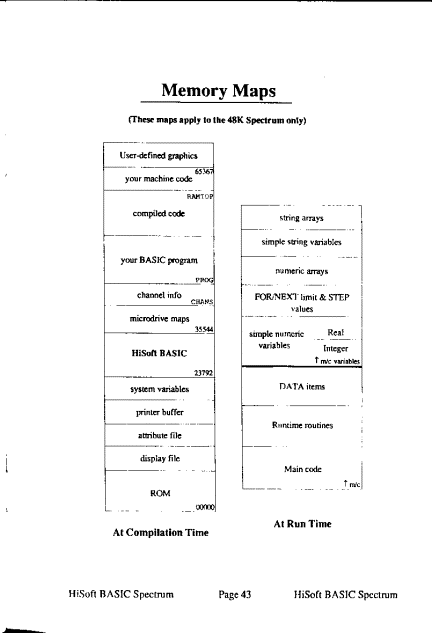
executing it. But beware of over-writing HiSoft BASIC -
see Memory Maps.
The
last two programs on the tape are SHELLSORT and QUICKSORT. Lines 9000 and
higher of these two programs contain subroutines that son an array X () of
numbers into ascending order using two different algorithms. The rest of these
programs are for testing the speed of these two algorithms in sorting data that
is randomly arranged and data that is already in order. You will find that
QUICKSORT is faster for randomly-arranged data but SHELLSORT is faster for data
that are already almost all in order. The subroutines can easily be modified to
sort into descending order or to sort strings instead of numbers. If you
compile them, you will find that the compiled versions are up to 19 times
faster!
How
to Use HiSoft BASIC
1.
LOAD "HiBasic" [ENTER]
(there
are 3 parts which will load in sequence).
2.
Either type in your BASIC program or LOAD it in from tape or microdrive (there is space for BASIC programs up
to about 30K in length). Note: You
must arrange your BASIC program so that it is possible to execute it
by simply entering RUN (that is,
it must start at the lowest line and all variables must be defined within the program). For example, if you
have a BASIC program which you
execute by entering RUN 9000 then insert a new line at the beginning that says GOTO 9000.
3.
Make sure your BASIC doesn't include any of the commands or functions that aren't supported by HiSoft
BASIC (see Summary of differences from
Spectrum BASIC).
4.
Insert a new line with the compiler directive REM : OPEN # at the beginning of your program.
Other compiler directives are optional.
5.
RUN your program to make sure that it works. Try it with different inputs to
cover all the possibilities and test out all the branches of the program. The
compiled code will be designed to reproduce the effect of the BASIC (except
faster!), so if it doesn't work in BASIC, the compiled version won't work
either and may even crash. Conversely, if your program works in BASIC, you can
expect the compiled code to do the same. It is a good idea to SAVE your BASIC
program before proceeding.
6.
Compile by typing *C (see HiSoft BASIC Commands).
Refer to Error messages if compilation stops with a message at the bottom of
the screen.
7.
SAVE the compiled code.
The
compiled code is like any other machine code program. To execute it requires
the command RANDOMIZE USR xxxxx where xxxxx is its address. The compiled code
will return to BASIC at points where there was a STOP command or a REM : CLOSE
# directive or if it reaches the end of the program. Note that you must CLEAR
wwwww before LOAD ing in the code, where wwwww is any address less than xxxxx.
HiSoft
BASIC Commands
Commands
may be typed in upper or lower case. Execution of the command is immediate upon
receipt of the final character (no [ENTER] is needed). If at any time these
commands should stop being accepted, re-initialise the command interpreter by
RANDOMIZE USR 23792. Spectrum 128 and Spectrum Plus 2 owners should read
Appendix 1 first.
*C Starts
compilation of the BASIC program. Compiles those portions of the BASIC between
compiler directives REM: OPEN# and REM: CLOSE# . The compiled code is placed
just below RAMTOP and RAMTOP is revised. The following information is given
during the first pass: the relative addresses of the entry points to the code.
During the second pass: the execution addresses of the entry points to the code (both in decimal and
hexadecimal). Compilation pauses
after these until you press a key.
At completion :
- the number of bytes taken up by the
compiled code
- the number of bytes needed for machine
code variables
- the number of bytes occupied by the
BASIC program
- the commands to be used to SAVE the
compiled code and to LOAD it back in afterwards.
The
final screen is also sent to the printer if one is connected. Other information is available by use of the
compiler directives REM : LINE and REM : LIST
*X
Does
the same as the BASIC command CLEAR 65367 except it doesn't do a CLS or a
RESTORE. That is, it sets RAMTOP to 65367 (just below the usual position of the
user-defined graphics) and sets up the machine stack there. In the context of HiSoft
BASIC, it effectively erases previously-compiled code and
thus provides space for new code. Note that if you have some machine code in
high memory that you want to preserve then don't use *x, instead CLEAR to just
below your machine code.
*R
Executes
the newly-compiled code, starting from the first entry point. This command does
the same as RANDOMIZE USR xxxxx where the address xxxxx is the one on the final
screen (except that it doesn't affect the system variable SEED).
*T
This
command is used to find out information about the variables used in your BASIC
program. This information can then be communicated to HiSoft BASIC by
means of compiler directives, enabling the compiler to produce more efficient
code. The command *T gives the types (see
Variables) of the simple numeric variables used (no information
is given on arrays). It also gives the maximum lengths attained by the simple
string variables used. After you first type *T nothing will appear to have
happened but an interrupt-driven program has been turned on and the BASIC
variables have been CLEARed. From then on, until you type *T again, the
interrupt-driven program polls the BASIC variables (except for arrays) and
maintains a file of the variable names and types. The second *T displays this
file and then deletes it. In between the two *Ts you can do anything you
normally do in BASIC. The bottom of the screen will go BRIGHT to show that you
are in *T mode. The normal procedure would be to RUN your BASIC program one or
more times (with different inputs) so that the variables cover their whole
range of values. There is a small possibility that *T may give incorrect
results because it only looks at the variable every 1/50 of a second. For
example, with the one-line program 10 LET 1=1 : LET I=.5 : LET 1=1, the
sequence *T, RUN, *T will tell you that I is POSINTEG when clearly it should
say REAL. So *T is not an infallible guide to the variable types, but for most
programs it works wonderfully.
*ERASE
Removes
the BASIC program and variables from memory without affecting HiSoft BASIC or
any machine code above RAMTOP (to get ERASE, get into extended mode, then press
[SYMBOL SHIFT]-?). Note that this is drastically different from NEW which would
eliminate HiSoft BASIC as well since it lies below RAMTOP).
To prevent you from accidentally doing a NEW, it has been disabled (but if you
really want to get rid of everything, type a colon and then NEW).
BREAK
Pressing both [SPACE] and [CAPS SHIFT] (the normal BREAK procedure) will stop
whatever program is executing at the moment, including machine code programs.
This means that you can try out the compiled version of your program and stop
it at any point (note, however, that the compiled code, like most machine code
programs, does not include any test for BREAK and so, when you are using the
compiled code outside of HiSoft BASIC, there is no
way to stop it before it returns to BASIC).
The
following commands would normally be used only when directed to do so
by
HiSoft BASIC:
*D As *C but stores only the code
generated by the DATA statements.
*E As *C but does not store the code
generated by DATA statements, i.e. it stores all the code except that of DATA
statements.
These
two commands are used to break up a large program that includes DATA statements
into two parts: the code proper and the data. It does not matter which of the
two commands is done first but both must be done. A flashing D or E will appear
on the final screen to remind you which part you have done. Unless you are
using the REM : USR directive, you must reset RAMTOP after doing the first part
(either *D or *E) so that it is the same for both parts in order that both
parts will be designed for the same execution address. Thus a typical sequence
would be : *X, *D, SAVE the data part, *X, *E, SAVE the code proper. Note
that the two parts will form one continuous block of code in your final program
and so, after you re-LOAD the code, you can SAVE it as one block if you desire.
Summary
of differences from Spectrum BASIC
(See
further comments in Notes on compiled BASIC)
1.
No expressions (except VAL "number") are allowed in DIM or DATA statements.
2.
If expressions (other than VAL "number") are to be allowed in
GOTO, GOSUB or RESTORE statements,
then the appropriate compiler directive
must be used.
3.
Arrays of three or more dimensions (e.g.
X [ I, J, K ]) are not supported.
4.
VAL stringvariable (e.g. VAL A$)
is not supported, (but VAL "expression" is okay).
5.
The system commands CLEAR,
CONTINUE, ERASE, FORMAT, LIST, LLIST, LOAD, MERGE, MOVE,
NEW, RESET, RUN, SAVE,VERIFY are not supported (but passing back and forth
between BASIC and the compiled code is easy so you can incorporate these in
your programs).
6.
INPUT commands are automatically error-trapped.
7.
BREAK is disabled.
8.
The default attributes of PAPER 8; FLASH 8; BRIGHT 8 that BASIC uses for PLOT,
DRAW and CIRCLE commands are not instituted in the compiled code.
9.
The printing of a string that contains colour control codes may change the
default attributes in subsequent PRINT statements.
Variables
HiSoft
BASIC allows all of the variable names that BASIC does. The
speed and storage space of the compiled code are (unlike in BASIC) the same
whether you use long or short variable names so descriptive names are to be
encouraged for readability. HiSoft BASIC supports
numeric and string arrays of up to 2 dimensions. Ordinary string variables
behave as in BASIC except that they must not exceed in length the amount of
space reserved for them at compile time. By default this is 257 bytes (to allow
a string of up to 255 characters, plus 2 bytes for the length) but it can be
changed by means of the REM : LEN directive.
Variable
Types:
The
type of a variable is an indication of the range of values it may contain. In
BASIC, variables are of two types: numeric and string. HiSoft BASIC has 3 numeric types as well as
strings. The default type is REAL. Variables may be declared to be INTEG or
POSINT in order to enable more efficient code to be generated (see Compiler
directives). If you don't care that much about speed or the size
of the compiled code you can just forget about the integer types and keep
everything as REAL. All variables used in the compiled code are stored in their
own area just after the code (not in the BASIC variables area).
REAL:
This the same as the BASIC numeric type; i.e. REAL variables can take on all
floating-point values between -1.7 E 38 and +1.7 E 38 (but note that the
smallest non-zero positive number is 2.94 E-39). REAL variables take up 5 bytes
and are stored in the same format as in BASIC.
INTEG:
The values taken by an INTEG variable are restricted to integers (whole
numbers) between -32768 and 32767 inclusive. INTEG variables take up 2 bytes of
storage in the standard Z80 format (least significant byte first);
POSINT:
The values taken by a POSINT variable are restricted to positive integers
(whole numbers) between 0 and 65535 inclusive. POSINT variables take up 2 bytes
of storage in the standard Z80 format (least significant byte first).
Note
that the ranges of POSINT and INTEG variables overlap. If a variable takes on
only integer values between 0 and 32767, you have the option of declaring it to
be either POSINT or INTEG (*T will show such variables as POS INTEG). The
storage locations of variables can be obtained by the use of directive REM :
LIST. Note that the current length of an ordinary string
variable (or the length of each string for a dimensioned string variable) is
stored in the first two bytes of the space reserved for that string variable,
followed by the text of the string (or strings).
Numerical
Constants
Numbers
may be in ordinary or in scientific notation. For the purpose of storage format
and evaluation of expressions, the type of a number is taken to be that of the
range in which it falls (see Variable Types). The
exception to this is if no INT or INT+ directives have been used. In this case
all numbers are taken to be REAL and stored as 5 bytes.
Conversion
between Types
REAL
values are rounded to the nearest integer when a POSINT or INTEG value is
required (error Integer out of range if bigger in absolute value than 65535).
Integer
values (between -65535 and 65535) are converted to lie in the proper range for
POSINT or INTEG types by adding or subtracting 65536 as appropriate. For
example, if the value 40000 is assigned to INTEG variable I, it will end up
that I = 40000 -65536 = -25536, whereas if -40000 is assigned to I, it will end
up that I = -40000 +65536 = +25536. If the value -3 is assigned to a POSINT
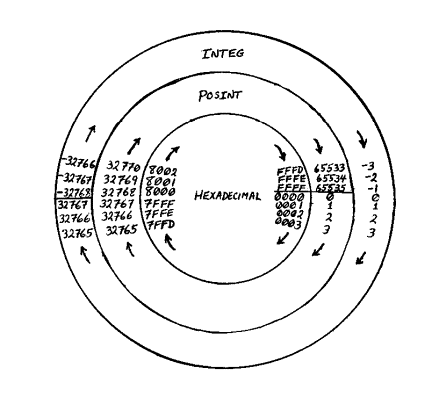
variable P, it will end up that P = -3 +65536 = 65533. The logic of all this is
shown by the diagram below which shows the different interpretations one can
put (depending on type declaration) to a given internal representation of a
number (shown in hexadecimal).
Compiler
Directives
Compiler
directives are a means of giving instructions to the compiler. Each compiler
directive is of the form REM followed by a colon (:) followed by a Sinclair
keyword and each must be on a separately-numbered line within the BASIC program
to be compiled.
REM
: OPEN #
Turns compilation on and inserts code to
enable an entry from BASIC at this point.
REM
: CLOSE #
Inserts code for a return to BASIC and
turns compilation off. Optional if
compilation right to the end of the BASIC is desired (note that this directive is equivalent to a STOP from the
point of view of the compiled code
although of course it has no effect on
BASIC).
Note:
The following compiler directives must precede (i.e. must have a lower line
number than) the first REM : OPEN # .
REM
: LEN
Tells
HiSoft BASIC how much space to reserve for
non-dimensioned string variables. If a string variable is used without being dimensioned or appearing
in a REM : LEN directive, then the
compiler will reserve space for 255 characters plus 2 bytes for the length of the string.
Examples
of use:
REM : LEN D$<=5, F$<=704
would
allow D$ to be up to 5 characters long and F$ to be up to 704 characters long (thus, including
the 2 bytes for the length of the
string, it would reserve 7 bytes for
D$, 706 bytes for F$). Any other non-dimensioned string variable would have space
reserved for 255 characters.
REM : LEN D$<=5, F$ <=704, $<=32
As
before but any other non-dimensioned string variable is limited to 32 characters (there would be 7
bytes reserved for D$, 706 bytes
reserved for F$ and 34 bytes reserved for any other). The $ without any letter changes the default max-length. The default max-length cannot be greater
than 255. Note that LEN appears only once and that <= is the
single symbol obtained by [SYMBOL SHIFT]-Q. Please note that if you declare
for example that D$ will never be
more than 5 characters long (as
above) and then LET D$ = "MISTAKE", the extra characters will overwrite something else and the
results will be unpredictable. So
you should always reserve more space than
will ever be needed. The use of *T can help you avoid counting.
REM
: USR
Tells
HiSoft BASIC where you want the compiled code to start. HiSoft BASIC always locates the compiled code at the top
of memory (as given by RAMTOP) but
the code can be designed to
execute from any address you specify. If you don't include a REM : USR directive then the code will
usually be designed to execute
from where it is. If you do include a REM : OSR directive then the compiled code must be SAVEd and then re-LOADed to its proper address before
you try to execute it. For
example, REM : USR 30000 would make the compiled code executable from address 30000.
REM
: INT
Tells
HiSoft BASIC that certain variables will be of type INTEG. For example: REM : INT A,
C, SCORE, A(), B tells HiSoft BASIC that the simple numeric variables A, C,
SCORE and B will be of type INTEG and that the array A () will also be of type
INTEG.
REM
: INT+
Tells
HiSoft BASIC that certain variables will be of type POSINT. For example: REM : INT +
J, I, Level, K(), K tells HiSoft BASIC that the simple numeric variables
J, I, LEVEL and K will be of type
POSINT and that the array K() will also be of type POSINT.
REM
: INT FN
Tells
HiSoft BASIC that certain defined functions will return values restricted to
integers in the range -32768 to 32767. For example, REM : INT FN A, T, B tells HiSoft BASIC that the defined-functions A, T and B will
have INTEG values.
REM
: INT+FN
Tells
HiSoft BASIC that certain defined functions will return values restricted to positive integers in the range 0 to
65535. For example, REM : INT + FN
N, I, p tells HiSoft BASIC that
the defined-functions N, I and P will have POSINT values.
REM
: FN(INT)
Tells
HiSoft BASIC that certain one-letter variables are to be considered as type INTEG when used as dummy variables in
a DEF FN statement. For example,
REM : FN (INT A,B,C) tells HiSoft
BASIC that the dummy variables A, B and C are to be considered of type INTEG in all DEF FN statements.
Note that A, B and C might be a
different type when they are not used
as dummy variables.
REM
: FN(INT +)
Tells
HiSoft BASIC that certain one-letter variables are to be considered as type POSINT when used as dummy variables in
a DEF FN statement. For example:
REM : FN(INT + I,J,K)
tells
HiSoft BASIC that the dummy variables I, J, and K are to be considered of type POSINT in all DEF
FN statements. Note that l, J and
K might be a different type when they are not used as dummy variables.
REM
: GOTO
REM
: GOSUB
These
two directives are completely equivalent. If you use either of them, then GOTO and GOSUB expression (e.g.
GOTO 100 *N) will be supported and
the compiled code will include a
list of line numbers and the corresponding addresses in the compiled code. There are two forms : If
the GOTO or GOSUB is followed by :
(e.g. REM : GOTO :) then all of
the program's line numbers within
the region being compiled will be
included in the list. If
the GOTO or GOSUB is followed by a
sequence of line numbers (e.g. REM : GOTO 100,200,300) then only those line numbers will be
included in the list. In either
case, if a line number not in the list is needed, the compiled code will generate a run time error Statement
lost.
REM
: RESTORE
If
you use this directive then RESTORE expression (e.g. RESTORE 1000+N) will be supported and the compiled code
will include a list of the line
numbers of DATA statements and the
corresponding addresses in the data area of the compiled code. The two
forms of this directive (e.g. REM : RESTORE :and REM : RESTORE 1000, 1001, 1002) have a similar effect to those for REM : GOTO except that
here only the line numbers of DATA
statements are put in the list and the addresses are those in the data area of the compiled code.
REM
: LIST
Tells
HiSoft BASIC to produce a listing of the runtime routines used and the machine code variables. Addresses are given
in both decimal and hexadecimal.
REM
: LINE
Tells
HiSoft BASIC to print the address of the compiled code for each line of BASIC starting at a given line number.
During the first pass, the
relative addresses are given, while during the second pass, execution addresses (in both decimal and hexadecimal) are given. For example REM
: LINE 200 would result in the
addresses being given starting with line 200. Note that this is just for interest - entry to the compiled
code from BASIC should only occur
at points with a REM : OPEN #
directive.
REM
: LPRINT
Switches output from LINE and
LIST directives over to stream 3
(the printer). If this directive is used, HiSoft BASIC does not wait for you to press a key before
continuing so you may want to use
it even with no printer attached (or with it switched off) just to eliminate the waits for key presses
in those cases where you are only
interested in the information on the final screen.
Notes on compiled BASIC
The
following notes explain the differences between Sinclair BASIC and compiled
BASIC. They are somewhat technical and can often be ignored until a problem
becomes evident.
Arithmetic
Operators
(+,-,*
and/)
1. If one of the operands is REAL, the
other is convened to REAL if not so already.
2.
Division (/) is the ordinary (floating point) operation (operands converted to
REAL - not integer-division even if both operands are of integer type!). Thus
5/3 = 1.667 instead of the 1 you would get with integer-division (but see note
5 in Tips on Efficiency).
3.
The minus sign (-), whether unary or binary, converts a POS I NT value into an
INTEG value. ThusifPlandP2 are both of type POSINT, (P1-P2) is of type INTEG as
is (-P2). Note that since POSINT
can be as large as 65535 while the most negative INTEG is -32768, you
can get some out-of-range values this way. No error message will be generated -
you may just get some strange results (see Conversion between Types).
So beware if you are subtracting POSINT values larger than 32768 (not that
likely).
4.
Apart from the exception of note 3, the type of the result from a sum,
difference or product is the dominant type of the two types involved. REAL
dominates both INTEG and POSINT while INTEG dominates POSINT. Thus, for
example, if R, I, and P represent quantities of the types REAL, INTEG and POSINT respectively then (I*R) is of
type REAL, while (I+P) is of type
INTEG.
5. Because (P+I) and (I+P) are type
INTEG, there may be a slight difficulty
(similar to that of note 3) if the POSINT value is greater than 32767.
For example, if P =65535 and l=-l,
then you might expect (P+I) to be 65534 but since it is supposed to be INTEG,
the value you would get (see Conversion between
types) if you did PRINT (P+1) would be -2. Since -2 has the
same internal representation as 65534 (it's only the type declarations that
differentiate them!) this would be okay if you were using (P+I) to specify a
memory address. A way out of all this confusion would be to use POSINTS greater
than 32767 only for addresses or as FOR/NEXT loop variables where the
difficulties are taken care of automatically. An alternative is always to
assign such problematical expressions to a POSINT variable (if they are
supposed to be positive) before using them. Thus : LET p=p+i : PRINT p gives
65534 as desired.
Comparison
operators
1.
If one of the operands is REAL,
the other is converted to REAL if
not so already.
2.
The result of a comparison between REAL values is of type REAL. The results of
all other comparisons are of type POSINT.
3.
Note that if P is a POSINT quantity, p>=0 is always true, so something like
LET p=p-l : IF p>=o THEN GOTO 100 doesn't make sense.
AND,
OR
The
result of these operations is of the same type as the first operand.
LET
When
an expression is assigned to a variable, the value of that expression is
automatically converted to the type appropriate for that variable. Error
messages or erroneous results may be generated if you try to assign an out-of-
range value to a variable. For example, suppose I and R are respectively INTEG
and REAL variables. LET R=I would (as you'd expect) give R the value of the
variable I. LET I=R would round the value of R to the nearest integer before
assigning it to I; e.g. if R=3.14 then I would be 3 . If the value of R is
bigger in absolute value than 65535 (so it won't fit in two bytes) you would
get the error message Integer out of range. However, LET
1=40000.3 (a REAL value) or LET 1=40000 (a POSINT value) would generate no
error message even though the value is too big for the INTEG range. Instead,
the result would be that I would get the value -25536 (see Conversion
between Types).
INPUT
1.
INPUT statements are error-trapped and any error in input will result in a
restart of the INPUT statement. This means that there is no way out of an INPUT
statement other than giving input of the type requested.
2.
The evaluation of numeric inputs is done via the BASIC VAL routine so
expressions involving existing BASIC variables (as opposed to machine code
variables) are accepted as input.
3.
See the note under LET concerning out-of-range values.
FOR/NEXT
Be
careful that, in a FOR/NEXT loop, the loop variable does not try to go out of
range
for its type. For example:
10
REM : INT + P
20
REM : OPEN #
30
FOR P=100 TO 0 STEP -1
40
body of loop
50
NEXT P
Here P is declared as POSINT (and
there's nothing wrong with having a
negative STEP value with a POSINT loop variable!) so that after what
should be the last iteration (with
P=0), the NEXT P statement tries to decrease P but instead of becoming -1, P becomes 65535 so the loop will
never terminate. The problem lies
in not recognising that loop variables always end up one STEP past their limit value.
GOTO,
GOSUB
1. Unless one of the compiler directives
REM : GOTO or REM : GOSUB is being used, the line number
must be given explicitly as a number or as VAL "number".
2. The line referred to must actually
exist within the portion of BASIC being compiled (if you have trouble with
this, put in a REM statement with the appropriate line number).
RUN
RUN is not supported but it can be
replaced by a GOTO the first line of your program. You may want to put in a CLS
statement at the beginning.
RETURN
Be
careful not to allow the execution of a RETURN from a subroutine without having
done the corresponding GOSUB. This would cause an error Return without
GOSUB in BASIC but it may crash the compiled code.
STOP
STOP
causes a return to BASIC from the compiled code. Note
that the REM : CLOSE # directive is effectively the same as a STOP from the
point of view of the compiled code.
DIM
1.
HiSoft BASIC supports both numeric and string arrays of up to 2 dimensions.
The dimensions of the array as given in the DIM statement are fixed at compile
time and must be given as explicit numbers or as VAL "number" (no
expressions allowed).
2. The dimensions of an array must be
the same throughout the program. That is, you cannot re-dimension an array with
different numbers than those used in the first DIM.
3. You must not use a string variable as
an ordinary string variable at the beginning of a program and then later change
it to a dimensioned string variable with a DIM statement.
4.
There are no checks within the compile code to ensure that an array index is
within range.
CLEAR,
CONTINUE, ERASE, FORMAT, LIST, LLIST, LOAD, MERGE, MOVE, NEW, RESET, SAVE,
VERIFY
None
of these system commands is supported by HiSoft BASIC
but you can still use any of them by going back and forth between BASIC and the
compiled code. These commands are often inappropriate or inconvenient in a
purely machine code program.
VAL,
VAL$
1.
VAL$ is not supported (no great loss!).
2.
VAL "Expression" is the only form that is supported. Here, Expression
must be a numeric expression. The form VAL string variable (e.g. VAL A$) is not
supported because to do so would have entailed either a great loss in
efficiency overall or would have required the whole of the compiler to be
present with the compiled code at execution time.
3.
Sometimes the unsupported form VAL A$ can be replaced by a series of
statements.
E.g.: IF A$
= "1" THEN LET A = 1
IF
A$ = "2" THEN LET A = 2
RESTORE,
READ, DATA
1.
On entry to the compiled code (at every REM : OPEN #) an automatic RESTORE is done to set
the data-pointer to the first of the machine code DATA items.
2.
Unless a REM : RESTORE directive is used, the line
number is under the same restrictions as that of a GOTO.
3.
If you READ from a DATA list into a POSINT or INTEG variable then that DATA
list must be prefaced with INT (extended mode R) to tell HiSoft BASIC to
store the data in integer format (2 bytes per number). For example:
10
REM : INT +X,Y,I
20
REM : OPEN #
30
FOR 1=1 TO 50
40
READ X,Y : PLOT X, Y
50
NEXT I
60
DATA INT 127, 87, 126, 85
70
DATA INT 26, 50, 29, 51
4.
Only numbers, VAL
"number" and explicit strings are allowed in DATA statements.
Variables and other expressions in DATA statements are not supported. Instead
of READing an expression into a variable you can do it (albeit less
conveniently) by a direct LET statement.
5.
The machine code data pointer is stored at 23660 in the space normally used for
the BASIC system variable S-TOP.
PLOT,
DRAW, CIRCLE
In
BASIC, the commands PLOT, DRAW and
CIRCLE have as default attributes PAPER 8; FLASH 8; BRIGHT 8 so that the only
attribute changed by these commands is the INK . For efficiency's sake, the setting of these default
attributes is omitted in the compiled code. This means that (in the odd cases
where it makes any difference) to get the same effect as in BASIC you would put
these attributes in explicitly; e.g. PLOT PAPER 8; FLASH 8; BRIGHT 8; X, Y
instead of merely PLOT X,Y. An artificial example of a case where it makes a
difference is the following:
INK
6 : PAPER 4: CLS : PAPER 7 : PLOT 127, 87
DEFFN
If
a defined function has more than 4 arguments, then the arguments must be all of
the same type.
Including
other machine code
A
compiled program may call other machine code routines. Of course, the machine
code must not overlap with the compiled code - use the REM : USR directive if
necessary to avoid this. If you want to test the compiled code together with
your other machine code while HiSoft BASIC is still
present, then the other machine code must not overlap HiSoft BASIC
(see Memory Maps). Note that machine code which
relies on the structure of the BASIC program or the location of BASIC variables
will not work when called from the compiled code (the same is true of POKES
from BASIC, e.g. POKES to system variables NEWPPC and NSPPC). Note also that
when HiSoft BASIC is present, BASIC programs are
higher up in memory than usual.
Compiling
large programs
Before
compiling a large program, type *X to clear out any junk that may be cluttering
high memory (in the extreme cases, where you need every last byte, it may be
necessary to CLEAR 65535 and say goodbye to the user-defined
graphics).
Note
that by means of the REM = USR directive, the compiled code can be designed to
start low enough (i.e. within the space now occupied by HiSoft BASIC) to
allow you to still use other machine code and user-defined graphics in the
final program (ifs just during the compilation process that we need the space).
If there is enough room below RAMTOP for
the compiled code and the machine code variables then space is reserved for the
machine code variables and the code can be tested in place. However, if there
is space for only the compiled code, then the variables are omitted and the
message DO NOT TEST is given. If HiSoft BASIC finds that
there is not enough space below RAMTOP for the compiled code, it will check if
there would be enough space if the BASIC program were deleted. If so, you will
be asked for permission to delete the BASIC, and if you allow this, HiSoft
BASIC will proceed to overwrite the BASIC with the compiled
code.
If you are trying to compile a large
program that includes DATA statements HiSoft BASIC
may direct you to Use *D, *E. This means that it is not possible to compile the
program in one go. You must use *D and *E to compile the data separately from
the rest of the code (note that it is better to do the smaller of the two parts
first to lessen the chance that the BASIC will have to be deleted and re-LOADed
before doing the second pan. This usually means doing *D before *E).
If
you get the message Not enough room for M/C and you haven't just refused
permission to delete the BASIC, then you must somehow reduce the length of the
compiled code to get it to fit. Using INTEG or POSINT variables instead of REAL
can save a lot of bytes. Try to find out (by using REM : LINE) which parts of
the program use the most bytes and replace as many statements as possible by GO
SUBS to subroutines. Try to make your assignments to variables via READing from
DATA statements instead of with LET. If you are using computed GOTO, GOSUB or
RESTORE, then direct HiSoft BASIC to include in
the list only those line numbers actually needed.
If
your BASIC program breaks up naturally into independent parts (i.e. parts that
don't share variables) then you could compile these parts separately. However,
you should be aware that doing this involves a certain amount of duplication of
runtime routines (just how much duplication can be ascertained by using the REM
: LIST directive).
Tips
on Efficiency
1.
Use integer variables (POSINT or INTEG) wherever possible, especially in
FOR/NEXT loops (POSINT FOR/NEXT loops are slightly more efficient than INTEG
ones). Sometimes programs involving REAL variables can be re-written (perhaps
by scaling everything up by a factor of 10000 etc.) to enable them to be
expressed in terms of integer variables.
2.
If you use defined functions, try to arrange it that their arguments are
integer variables and that the function returns an integer value. Then tell HiSoft
BASIC this by means of the appropriate compiler directives.
3.
In expressions, try to put the simpler of the two operands on the right side of
the operator. If you do this, HiSoft BASIC will be able
to recognise many of the simple cases and code efficiently for them. For
example, LET A=B*2 will result in far faster code than LET A=2*B because in the
first case, HiSoft BASIC recognises the simple case of
multiplications by two. A number is simpler than a simple numeric variable
which is simpler than an array or a function (but note that an array indexed by
a number (instead of a variable) is equivalent to a simple variable because HiSoft
BASIC recognises this case and computes its address at
compile-time). Some of the simple cases recognised by HiSoft BASIC:
-multiplication or division by a power
of 2
-changing an integer variable by 1, 2 or
3
-operations with simple numeric
variables (or array variables with constant indices)
Thus P+3
is better than 3+P
II
+ 12) *P is better than P* (II +12)
IF
A (I) >P is better than IF P<A(I)
4. HiSoft BASIC
recognises the two cases of squaring and cubing and codes to do these by means
of multiplication rather than using the general to-a-power routine (which is
very slow). That is, it effectively replaces \cf1 }2 by x*x and x3 by
x*x*x, however it does this in such a way as to generate more efficient code
than if you were to make these replacements in the BASIC. Here x can be any
quantity - not just a variable. Unfortunately, BASIC cannot cope with x2 or X
if x is negative, so you often have to modify things (e.g. to (ABS X) 2) just
to get the BASIC to work but otherwise it is best (from the point of view of
efficiency in the compiled code) to leave it as X2.
5. As mentioned above (Notes on
compiled BASIC) division is always considered as floating-point
division. However, in one special case, HiSoft BASIC
recognises that it can code for integer division and get the same answer as if
it did floating-point division. This is the case where the division occurs
inside an INT in the form INT (F1/F2) where Fl and F2 are both integer factors.
Fl and F2 don't have to be variables, they can be complicated factors (e.g.
(2+i2) 2) as long as they are either POSINT or INTEG But the expression inside
the INT must be of the form of something divided by something else and nothing
more. Thus INT (5 + F1/F2) and INT (F1/F2 + 5) would be coded using
floating-point division while 5 + INT (F1/F2) would gain the advantage of
integer division if Fl and F2 are integer factors Similarly, INT (5*F1/F2) would be coded using floating-point
division but INT ((5 *F1) /F2) would gain the advantage of integer division. So
if you want the truncated effect of integer division (or simply don't care
about the fractional part of a division) put your divisions inside INT .
Note that none of this affects the answer you get from a
division - the compiled code will always give the same answers as BASIC - it
just makes the compiled code more efficient. Note
also that the use of the REM : LIST directive will tell you which form of
division is being used.
6.
If you assign a REAL value to an integer variable, the value is automatically
rounded to the nearest integer. This means that in many cases, INT is redundant
and inefficient. Note that this is often true in BASIC as well, since all the
functions and commands that require integers automatically round values to the
nearest integer.
7.
In general, using strings is less efficient than using integer variables, so
avoid using strings where possible. A common example is in testing to see which
key is pressed. A poor way to do this would be (assuming we are in upper case;
POKE 23658, 8 to ensure this):
IF
INKEY$ = "A" THEN….
IF
INKEY$ = "B" THEN….
Better
is: LET
K = CODE INKEY$ (where
K is POSINT)
IF
K = CODE "A" THEN....
IF
K = CODE "B" THEN....
because
this avoids the repeated INKEY$. HiSoft BASIC recognises the form CODE "A"
and converts this at compile time to the numeric code 65 but the CODE function
does get in the way of other optimisations. An even more efficient way would be
to find out (either from the appendix in the Spectrum manual or by PRINT CODE
"A" etc.) what the numeric code for each letter is and use this (instead
of CODE "A") in your program. Thus, best is :
LET
K = CODE INKEY$
IF
K = 65 THEN...... : REM "A"
IF
K = 66 THEN...... : REM "B"
(But
see note 11)
8.
Even if you aren't using any integer variables you may want to declare a fake
integer variable in order to save bytes. If you don't have any I NT (F) or INT+
directives then all numbers that occur in the program will be stored in 5- byte
format even if they are small integers. By declaring a fake integer variable
(use a variable name not in use in your program) you will change this so that
numbers are stored in 2 bytes where possible. But note that arithmetic
operations between 2-byte numbers is integer arithmetic so that PRINT 0-65535
would give I! (See Conversion between Types).
9.
It is more efficient to put all numbers in the program in their decimal form
E.g. use 0.5 or .5 or 5E-1 instead of 1/2 because the latter form would get
coded as 1 divided by 2 and the division would have to be performed each time
the number is used (this is also the case in BASIC).
10^ To reduce the number of bytes taken
up by the compiled code use subroutines as much as possible. If even the
simplest statement is used more than once, it will save bytes if you make it a
subroutine (but you lose a tiny bit of execution speed).
11. HiSoft BASIC
recognises and codes efficiently for the common forms IF THEN GOTO and IF .....
THEN GOSUB ..... in the cases where only one statement (the GOTO or the GOSUB)
comes after the THEN. Multiple statements after the THEN negate these
optimisations so
IF
K=65 THEN GOSUB 1000 : REM "A"
results in less efficient code than
IF
K=65 THEN GOSUB 1000
12. If you are using computed GOTO,
GOSUB or RESTORE statements (e.g. GOTO 100*N) then try to determine which lines
are actually needed (e.g. if N is 1 2 or 3 then only lines 100, 200 and 300 are
needed for the above example) and tell HiSoft BASIC
this by means of the appropriate compiler directive This will save on bytes as
well as making the compiled code run faster because there is a shorter list of line
numbers to search through. Even if you are including all the line numbers (e.g.
with REM : GOTO : directive) you can speed up the search for the most commonly
used line number by including an additional directive with these commonly-used
line numbers listed (e.g. if you have a REM : GOTO : directive but lines 3000
and 4000 are used frequently, then adding a REM GOTO 3000, 4 000 directive would be beneficial as then these
line numbers would be put at the start of the list).
What
if it doesn't work?
If
the compiled code doesn't do what it is supposed to do, the first thing you
should do is to remove all the compiler directives relating to integer
variables (just putting another REM in front of them will effectively remove
them). Then re-compile and try it again. If it works now, you will know that
the problem was to do with an integer variable being assigned on out of range
value or a DATA statement lacking an INT
If
it still doesn't work, you should go back to the BASIC version of the program
(always keep the BASIC version!) and RUN it, doing exactly the same things you
did when trying the compiled version. If the BASIC version performs okay in the
same situation then you probably have found a bug in the compiler! If you can,
try to isolate the bug (i.e. find out which statement causes the problem) and
write to us at the following address:
HiSoft
The
Old School
Greenfield
BEDFORD
MK45
5DE
Error
Messages
Invalid
compiler directive
Check
the section on compiler directives for the correct syntax. You will get this
message if you try to declare a variable twice.
Expecting
a number
See
the appropriate command in Notes on compiled BASIC.
Expecting
an integer
You
have used INT at the beginning of a DATA statement in which there are
non-integer values (see Notes on compiled BASIC).
Not
supported
See
the appropriate command in Notes on compiled BASIC.
Non-existent
line
You
have a GOTO, GOSUB or RESTORE referring to a line that is either non-existent
or outside the region to be compiled.
Too
many variables
The
maximum number of simple numeric variables is 255.
No
more space
This
is a multi-purpose error message. If you are using one of the REM GOTO, GOSUB
or RESTORE directives then you will get this message if storage of more than
450 line numbers is needed. Similarly, you may get this message with a GOTO,
GOSUB or RESTORE followed by an explicit line number if there is no more space
for storage of line numbers. If you get this message with an IF statement, it
means that you have too many nested IFS (maximum is 10). If you get this
message in reference to a variable, it means that there is no more space for
storage of variable names. In this case you could remedy the situation by using
shorter names.
Use
*D, *E
See
Compiling large programs
Not
enough room for M/C
The
compiled code will not fit in memory below RAMTOP. See Compiling large
programs.
Exec.address
too high
The
execution address you have specified (by means of a REM : USR directive) does
not leave room for the compiled code and its variables to fit in below RAMTOP.
Perhaps RAMTOP can be raised (by means of CLEAR or *X) to enable the code to
fit.
DO
NOT TEST
This
message is a warning to you that the compiled code is not in its proper
position and hence you cannot execute it without first saving it and then
re-LOADing it to its proper address. Note that the code in its proper position
may overlap HiSoft BASIC (making HiSoft BASIC
inoperable) - check the Memory Maps.
No
file space
This
message occurs during the use of the * T command if either there are too many
variables (or too many long variable names) to fit in the allocated space
(unlikely) or (more likely) if there is not enough space to create the file in
the first place. The file takes up 2000 bytes in a fake BASIC line at the end
of the program area. It is also possible that a BASIC error Out of Memory
will be encountered during the execution of a BASIC program (while *T is in
effect) because of the extra space taken up by the file.
The
meaning of the dots and colours
HiSoft
BASIC makes 3 passes through the BASIC. The zeroth
pass with magenta border) checks merely for unsupported commands and picks out
all the compiler directives and DIM statements. The first pass
(with cyan border) is a dry run that determines how long the compiled code will
be and locates the destination addresses of the GOTOs, GOSUBs, etc. The second
pass (with white border) is when the actual machine code is generated.
During
compilation, HiSoft BASIC uses the display file (the area of
memory usually used to store the TV picture) to store its own variables and
other information such as the files of BASIC variables and line references.
This information appears as dots on your screen. Furthermore, the calculator
stack and the machine stack are relocated to the attribute file (where the
colours are stored) during compilation. The calculator stack appears at the top
of your screen while the machine stack starts one third of the way from the
bottom (these two stacks grow towards each other and HiSoft BASIC is
headed for trouble if they meet!). So what you see in the changing colours is
actually in some sense the compiler's thought process while the dots are its
memory!
Making
a back-up copy
The
facility for making a back-up copy is provided in the BASIC loader program. LOAD as usual but hold down the S key
during the last part. When you hear the beep, prepare your new tape for
recording and then press a key as required.
To
transfer HiSoft BASIC to microdrive, follow the above
procedure but BREAK into the program after the beep. Then modify it by
inserting * "m" ; d; after every SAVE and LOAD, where d is the drive
number desired. Remove the -58, +58 from line 9999 and then finally GOTO 9999
will produce a microdrive copy. Modify the program in a similar way to obtain a
back-up copy on disc. Note that owners of 128K machines do not need to delete
the -58, +58.
Over
2000 hours of hard work went into making HiSoft BASIC
and every pirated copy steals away some of our rightful reward for this work.
Ultimately, software piracy hurts you, the consumer, because prices go up or
nasty copy-protection schemes are used and because programmers like ourselves
will no longer find it rewarding to put the effort into writing good programs
for your computer. If you somehow find yourself in possession of a pirated copy
of HiSoft BASIC and you find it a good, useful
program, then please do the honest thing and go out and buy yourself a
legitimate copy!
Runtimes
The
compiled code includes only those runtime routines that are actually needed.
The RE M : LIST directive will tell you which these are. In the following, p,
I, R and S stand for POSINT, INTEG, REAL and STRING quantities respectively.
Note that many runtimes call other runtimes. The first twenty-nine are
concerned with comparisons.
1.
I=P
2.
P>=I
3.
P>I
4.
I<P
5.
I< > P
6.
P<=I
7.
l>=P
8.
I>P
9.
P<I
10.
l=P
11.
I<=I
12.
I>=l
13.
continuation of 12
14.
I>I
15.
I<l
16.
continuation of 15
17.
P<=P
18.
P>=P
19.
P>P
20.
P<P
21.
P=P
22.
P< >P
23.
S>=S
24.
S<=S
25.
S<S
26.
S>S
27.
S< >S
28.
S=S
29.
Compare
Strings
30.
Print S
31.
Print P
32.
Print I
33.
Single character of a string
34.
String slicer (n1 TO)
35.
String slicer(TO n2)
36.
String slicer(n1 TO n2)
37.
continuation of String slicer
38-46
not used
47.
Print an explicit string
48.
Calculate and stack parameters of an explicit string
49.
Read string
50.
Read integer (POSINT or INTEG)
51.
Read REAL
52.
On Error
53.
Error handler
54.
Exit from Input and Off Error
55.
Pause
56.
Set up Input
57.
Input integer (POSINT or INTEG)
58.
Input REAL
59.
Input string
60.
Get Input
61.
Round a REAL into HL
62.
USR string
63.
USR number
64.
Fetch integer array element
65.
Fetch REAL array element
66.
Calculate address of REAL array element
67.
Fetch string parameters
68.
Calculate parameters for a string from an array of
strings
69.
Assign to an unsliced string variable
70.
Calculate and stack parameters for a simple string
71. Calculate
parameters for a simple string
72. REAL
comparisons
73. Copy
a REAL from the calculators stack to (DE) but leave it on stack.
Runtimes
74-76 are concerned with REAL FOR/NEXT loops
74. Store
STEP value and test loop
75. Increment
loop variable and test loop
76. Test
loop
77. R
OR integer
78. R
OR R
79. integer
OR R
80. S
AND integer
81. S
AND R
82. R
AND R
83. R
AND integer
84. integer
AND R
85. R
* R
86. R/R
87. R*
2 ^A (
A is the value in the A register)
88. R^3
89. R
+ R
90. R
- R
91. NOT
integer
92. NOT
R
93. -R
94. ABS
R
95. SGN
R
96. I
DIV 2^B (DIV
is integer division)
97. P
DIV 2 ^B (B
is the value in the B register)
98. P
DIV I
99. I
DIV P
100. l
DIV I
101. continuation
of 100
102. cube
an integer
104.
integer multiplication
105.
ABS I
106.
SGN I
107.
SGN P
108.
Move a REAL from the calculator stack to (DE)
109.
Not used
110.
Put the following 5 bytes onto the calculator stack
111.
Put the POSINT value HL onto the calculator stack
112.
Put the INTEG value HL onto the calculator stack
113.
Exchange the top two values on the calculators stack
114.
Set the printers for a binary operation
115.
Test for zero
116.
INK
117.
PAPER
118.
FLASH
119.
BRIGHT
120.
COURIER
121.
OVER
122.
AT
123.
TAB
124.
Set to Stream 2
125.
Set to Stream 3
126.
Memory fill
127.
Random number generator
128.
INKEY$
129.
POINT
130.
ATTR
131.
CODE
Appendix
1
Spectrum
128 and Spectrum Plus 2 Version
There
are a number of differences between the Spectrum 128/Spectrum Plus 2 and the
48K versions of HiSoft BASIC. The 128 version supports the
PLAY command and the keypad, although the code it produces will run on any
Spectrum, whether 48K or 128K (on a 48K machine, the PLAY code simply is
ignored). The 128 version of HiSoft BASIC takes up
fewer than 500 bytes of user memory since most of the compiler sits in the RAM
disc. This means that it is possible to compile BASIC programs up to 40K in
length.
The
procedure for invoking HiSoft BASIC commands is
different. If you press [TRUE VIDEO] and [INV VIDEO] simultaneously, a screen
of command options will appear. The command you select will take effect
immediately. Note that the options correspond to those for the 48K version but
that there is a new P command, and that the command to delete the BASIC program
is different.
The
P command diverts the output of the next command to the printer (instead of the
screen). Make sure your printer is attached and ready if you use this command.
For example, press [TRUE VIDEO] and [INV VIDEO] simultaneously, then press P and
then C to compile and send all information to the printer (or whatever is on
stream 3).
The
command interpreter in the 128 version is implemented by means of a patch to
the bank-switching code instead of by an interrupt mode 2 routine as in the 48K
version (thanks to Andrew Pennell for the idea of the patch). Because of this,
it is not possible to BREAK into machine code programs as in the 48K version,
so you should be sure to provide an exit from your program (e.g. IF INKEY$=S THEN STOP) before you test-run
the compiled code. Note also that none of the addresses or pokes given above
are relevant to the 128 version.
The
compiler directives are the same as in the 48K version except that the L PRINT
directive is absent; its function having been replaced by the p command. Note
that the compiler will accept BASIC that has been prepared in either 48 or 128
mode, but that if you are typing in 128 mode the abbreviated directives OPEN
and CLOSE (without the #) will be accepted.
It
is worthy of note that if you are in the middle of editing a program line
pressing [TRUE VIDEO] and [INV VIDEO] simultaneously followed by [ENTER] will
return the line to what it was before. The effect is similar to that of the
EDIT key when in 48K mode. Note also that it is useful to switch to the lower
screen (via the 128 mode EDIT key) before compiling so that you can issue the
command to SAVE your compiled code without the information disappearing from
the final screen. Don't forget the usefulness of the SAVE ' and LOAD ! commands,
especially when you get the DO NOT TEST message because the compiled code needs
to be re-positioned.
An
additional feature of the 128 version is that all of the extra editing keys on
the optional keypad have been implemented on the standard keyboard (thanks to
Toni Baker for her original program, which appeared in ZX Computing Monthly).
These extra editing keys are described on page 7 of the 128 Manual In the
following table TV, IV and SS represent [TRUE VIDEO], [INV VIDEO] and [SYMBOL
SHIFT].
